
Quantcast

How to open a pdf in Illustrator if you don't have the fonts

Ivan's picture

Let's suppose you receive a pdf document that you need to further work on in Illustrator, but when you open it all fonts get replaced by the default font, because you don't have those fonts used in the pdf. The font information is there in the pdf, so theoretically if you could convert all the text to outlines you would be able to work with the document.
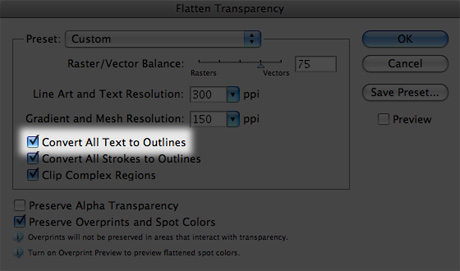
flatten transparency window

To do that you have to open a new Illustrator document. Place the the pdf. Select the menu Object / Flatten transparency. Make sure to check the Convert all text to outlines option and go. You got the whole pdf in curves.

3dogmama's picture

Great timing, Ivan. That is

Great timing, Ivan. That is going to save me some work on an upcoming project.
Cheers.
3dog.

"Without deviation from the norm, progress is not possible."
— Frank Zappa

"I accept chaos, I'm not sure whether it accepts me."
Bob Dylan

jHouse's picture

I discovered this by

I discovered this by accident once. Nice tip.

----
www.jhousedesign.com

----
BRANDING | PRINT | WEB
www.jhousedesign.com
----
AIM: jstudiochat
"Did I really try to find an "undo" button on a vending machine?"

carlosmh's picture

Just Great!

Big time saver.....

pokie's picture

Nice!!!!!! I knew you could

Nice!!!!!! I knew you could do it in Acrobat, but this is way easier.

zhade's picture

It wont work....

It wont work!
I created new .pdf in illustrator, used som random font. Wrote "text" saved the pdf in proper settings, then deactivated the font. Created new document in illustrator and placed that pdf, checked convert text to outlines in menu > flatten trans ...

What did I do wrong?

Andre

jHouse's picture

What do you mean it didn't

What do you mean it didn't work?! It can't not work lol.

----
www.jhousedesign.com

----
BRANDING | PRINT | WEB
www.jhousedesign.com
----
AIM: jstudiochat
"Did I really try to find an "undo" button on a vending machine?"

zhade's picture

oh my bad, I placed to pdf

oh my bad, I placed to pdf into illustrator but now I realised you also need to choose before that "Link"

now it works, just great :)

Andre

senojeel's picture

I also didn't notice the

I also didn't notice the "Link" check box. It worked for me now. Maybe that can be added to the instructions in the post?

senojeel's picture

This didn't work for me either

I was searching how to do this yesterday afternoon. When placing the pdf it says the font is missing and then substitutes a font. I did find that you can do this in Acrobat. Open the pdf in Acrobat. If there is not a transparent item there already, add a transparent watermark. Then go to Advanced > Print Production > Flattener Preview. In that dialogue check Convert All Text To Outline.

That worked for me.

Shawn

steveballmer's picture

How Primitive!

Bitmap fonts never fail you!

http://fakesteveballmer.blogspot.com

http://fakesteveballmer.blogspot.com
I am not Steve Ballmer pretending not to be me!

jHouse's picture

???? ---- www.jhousedesign.co

????

----
www.jhousedesign.com

----
BRANDING | PRINT | WEB
www.jhousedesign.com
----
AIM: jstudiochat
"Did I really try to find an "undo" button on a vending machine?"

RaelIAK's picture

no way for me to get this trick to work

when i import a pdf in illustrator (CS2) if the font is missing that one is automatically replaced. So, when I flatten all the text all I get is "my" font flattened, not the one that was missing.
Am I doing something wrong?
What does "you also need to choose before that "Link"" mean?

Ivan's picture

You don't import. You place.

You don't import. You place.

zhade's picture

The thing is when you create

The thing is when you create new document and go file > place and 1 click on the pdf file you also need to check "Link" box what appears in window before clicking finally "place" button!

Andre

donovan1's picture

what about raster images in the pdf file?

what if the pdf file contains raster imagas besides fonts? the transparency flattern would affect the raster images, and we don't want to change the pdf, but to open it for doing changes.

jomon's picture

OPEN AND EDIT PDF WITH MISSING FONTS IN ILLUSTRATOR

HELLO DONOVAN

hope u got an idea on how to open a pdf in illustrator if the embedded fonts are missing in your system. i think you got the perfect answer from Ivan. now a tip on your question about raster images.

consider a situation of a pdf file just containing Bill gates picture and the Microsoft tagline "Your Potential. Our Passion" in a font which is unavailable in your system. We can handle the font using Ivan's tip using "Flatten Transparency". but you are concerned with the quality of the image.

let us do the following. create a new document. place the pdf by LINKING it. position it in the desired location. now make a copy of the layer containg the pdf using the create new layer icon in the layers pallette. don't change the position. turn off the visibility of the new layer. select the bottom layer. select the placed pdf and click "Embed" button under the menu bar. ignore the font missing dialouge. now click select menu>object>text objects and delete all texts. now you are left with the original version of Bill's image. now go to the new layer and turn its visibility on. select the placed pdf. used the flatten transparency dialouge. and manually remove all objects other than the text matter, which is already outlined.

so you are safe. // if you knew it already, just ignore this. other less knowledgable folks may find help

-JOMON VARGHESE

nusnux's picture

cool

very useful function!!

jomon's picture

hey it's cool dude

hey it's cool dude. i am working as a prepress designer in the packaging fileld for the past 6 years. and we were facing troubles opening pdfs sent to us from the USA created in mac. we used to run to the nearest mac service provider and convret the fonts to outlines using illustrator. never even in my dreams i thought of this cool feature.

and i have replied to donovan1's post of 2008-10-23. please see what i do there.

thanks a lot. may god bless you.

Elias's picture

Use Adobe Acrobat

When all fails, I use Acrobat Pro to open the file then export it to "postscript" NOT encapsulated postscript, then choose "level 3". Open in it in Illustrator, which will prompt, again, that it is missing the fonts but this time it will convert them to outlines.

jomon's picture

NOPE!!! how does it work?

NOP!!!!

elias,

could you please explain how does it work? i tried your suggestion but the result is not as you say. when i open the ps in ilustrator it warns of missing fonts and the fonts are not outlines. if i choose to highlight the missing fonts, all fonts are there laughing at me :-). then waht did YOU do?!!!

and please note that my suggestion in my post OPEN AND EDIT PDF WITH MISSING FONTS IN ILLUSTRATOR works fine. this combines Ivan's tip of "flatten transparency" and my experiments. this is being done in actual production environment and is successful.

-JOMON VARGHESE

Elias's picture

You are absolutely right!

I have been using this method with Arabic fonts that needed to be placed in illustrator but since illustrator does not support Non Roman fonts, I have been using this method and never failed to convert into outline upon import. If a standard (Arabic) PDF was opened in illustrator, it would substitute the fonts with Roman fonts rendering it unreadable. Ivan's method has made it even easier to just place any PDF and flatten it. I have tried the embed method before which didn’t work which made me experiment with other methods within Acrobat but not within Illustrator. Thank you for your notes and Ivan for a much simplified method (works great).
Elias

Anonymous's picture

Thank you, you're a

Thank you, you're a lifesaver.

User login

Latest critique

suicidal monkeyFor

Internet.Commerce

Partner With Us


Sponsors